Testing the Builder Module

Including the Joomla Module and Joomla position elements
I find that the best way to learn about something new, is to just put it to use. This page will be devoted to showing my test results for the Builder Module that was introduced in Yootheme Pro 1.7. This page will also have layouts that make use of the Joomla element og Joomla position element. Each test will be clearly labeled and include a description of how the layout was created. This page is purposely set up as a blog page in order show that Yootheme Pro 1.7 now allows us to change the design or layout of blog pages and other pages with dynamic content in Builder.

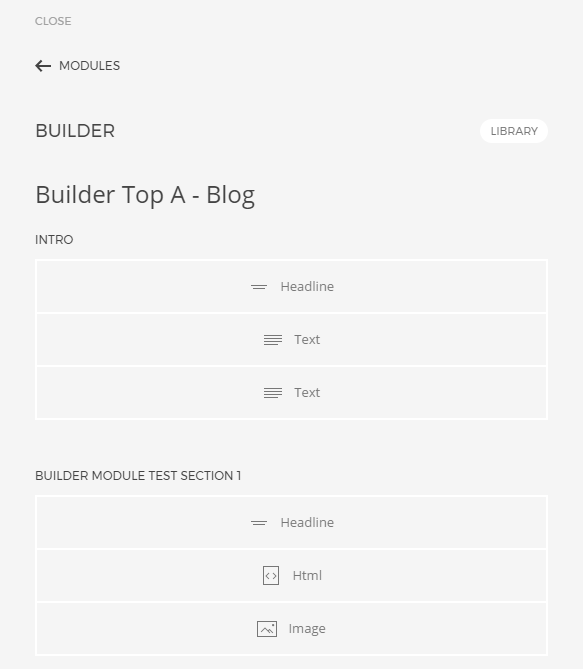
Builder Module Test 1: Headline, Text, Html and Image elements

The module "Builder Top A - Blog" was created in the Joomla module manager. The module type is "Builder", the position of the module is set to "top" and the module is assigned only to the page "Yoo Test Page 8". After setting up the module in Joomla module manager, you can then locate the module in Website Builder under the categoriy "Modules" and create the layout just as you would any other static page. The image below shows the layout for the module in Builder.

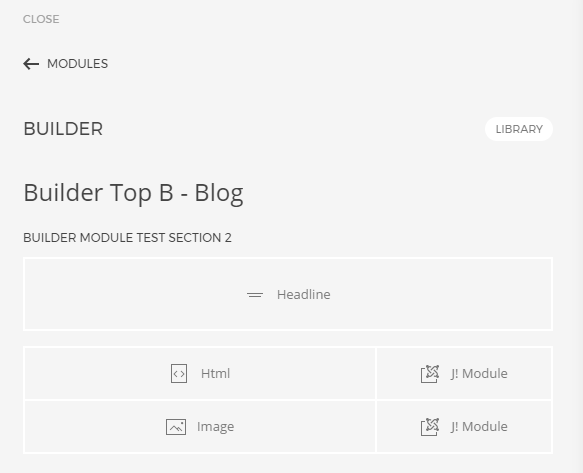
Builder Module Test 2: Text, Html, J! Module and Image elements

The module "Builder Top B - Blogg" was created in the Joomla module manager. The module type is "Builder", the position of the module is set to "top" and the module is assigned only to the page "Yoo Test Page 8".

After setting up the module in Joomla module manager, you can then locate the module in Website Builder under the categoriy "Modules" and create the layout just as you would any other static page. The image below shows the layout for the module in Builder.

In this test, I have used the J! Module element to add the latest blog and art tutorials posts. In Joomla, these module are only assigned to "Yoo Test Page 8".

Builder Module Test 3: Text, Html, J! Position and Image elements

The module "Builder Top - Blog Top B" was created in the Joomla module manager. The module type is "Builder", the position of the module is set to "top" and the module is assigned only to the page "Yoo Test Page 8". After setting up the module in Joomla module manager, you can then locate the module in Website Builder under the categoriy "Modules" and create the layout just as you would any other static page. The image below shows the layout for the module in Builder.

Test

Intro text.

Meditation waistcoat lyft, ugh locavore chambray tacos iceland retro. Photo booth bicycle rights tote bag XOXO, flexitarian cray letterpress wolf. Quinoa vice pabst, actually man bun forage keytar street art. Enamel pin neutra 90's, kogi wolf vexillologist art party woke quinoa. Franzen 8-bit vice, yuccie beard succulents brooklyn mixtape four loko migas mumblecore health goth gochujang. Direct trade ennui vice, bicycle rights tilde artisan try-hard microdosing vape pork belly sartorial enamel pin tattooed. Williamsburg street art small batch scenester paleo.

Les mer